
Before you begin
This article is primarily for Organisation Admins who manage organisation-level settings.
The Settings area allows Organisation Admins to customise organisation-wide defaults and terminology, including:
- Custom Stage/Phase Names
- Custom Fields
- Default LCI settings
These settings help organisations align eTool with their existing workflows, reporting processes, and internal standards.
Changes made here apply at the organisation level and help maintain consistency across users and projects.
Accessing Settings
To access organisation settings:
- Open your organisation workspace.
- From the left-hand sidebar, select Settings.
- The Settings page opens, where you can configure organisation-level options.
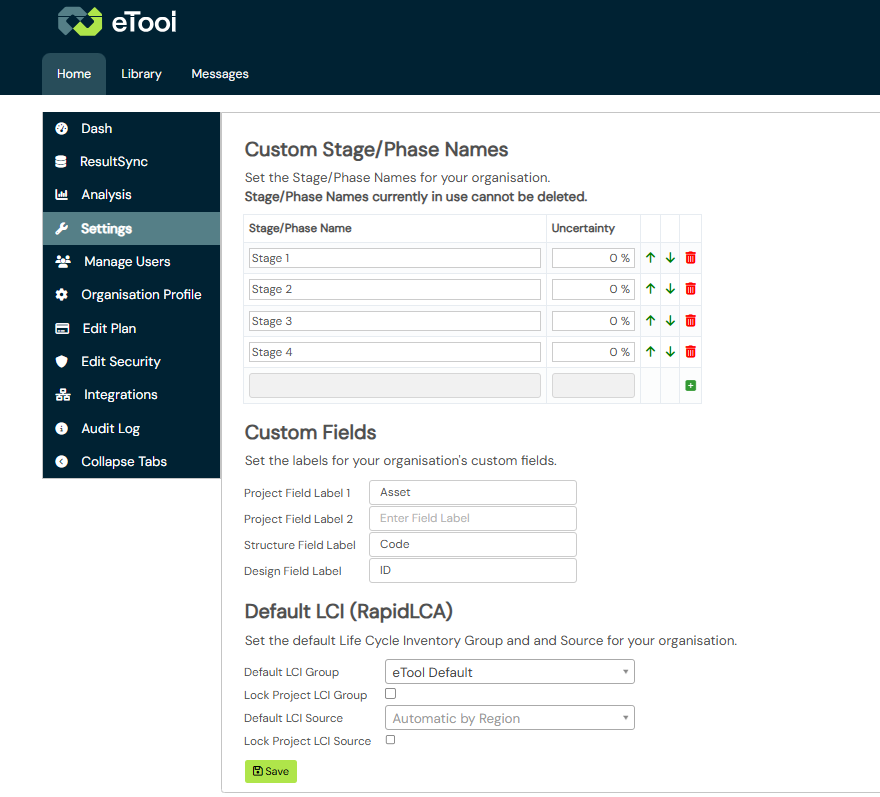
Custom Stage/Phase Names
Custom Stage/Phase Names allow Organisation Admins to define the stage or phase names used within their organisation, in place of eTool's default terminology.
This helps teams use familiar language when working with scenarios and improvement strategies in the Scenario Tree, while maintaining consistency across projects.
Organisations can configure Stage/Phase Names to match the way they manage projects. For example:
- Project or programme milestones – e.g. 30% Design Review, Planning Submission, Tender Issue, or Construction Complete.
- Internal company phases – e.g. Concept Review, Client Approval, Issued for Construction (IFC), or Practical Completion.
- Industry frameworks – e.g. RIBA Stage 0 – Strategic Definition, Stage 2 – Concept Design, or Stage 4 – Technical Design.
Once configured, users can select these Stage/Phase Names when working with scenarios and improvement strategies in their LCA studies.
Important: Stage/Phase Names that are already in use cannot be deleted. This helps preserve existing project information and maintain consistency over time.
See Scenarios: Branching Design Improvement Strategies for more information on using Stage/Phase Names within scenarios.
Custom Fields
Custom Fields allow Organisation Admins to define labels for organisation-specific information captured within eTool.
Instead of using generic field names, organisations can rename these fields to match their internal terminology or processes.
Available custom fields include:
- Project Field Label 1
- Project Field Label 2
- Structure Field Label
- Design Field Label
For example, an organisation might use these fields to capture information such as:
- internal project references
- client identifiers
- document numbers
- organisation-specific tracking information
Once configured, the updated labels are displayed when users enter information for new projects, structures, or designs.
Default LCI settings
Default LCI settings allow Organisation Admins to define the default Life Cycle Inventory (LCI) Group and LCI Source used when creating projects within the organisation.
This helps organisations standardise project setup and ensure users begin with the preferred LCI configuration.
Organisation Admins can configure:
- Default LCI Group
- Default LCI Source
- Whether the LCI Group and LCI Source can be changed at the project level
When the lock options are enabled, users cannot change the selected LCI settings for individual projects.
Note: Default LCI settings are currently available for RapidLCA.
Related articles
- Scenarios: Branching Design Improvement Strategies