Skip to content
  • There are no suggestions because the search field is empty.

User profile settings

Once you've created your eTool account, you can manage your information, plan, personal projects, and preferences from your profile.

Accessing your profile

Your account menu is available from the top right corner of the eTool interface. Select your profile name (or the person icon) to open the menu, then select My Profile.

From this menu you can also access:

  • My Inbox — view messages and organisation invitations.

  • My Tasks — view tasks assigned to you.

  • Help — access eTool help and support.

  • Log Out — sign out of eTool.


Personal Profile

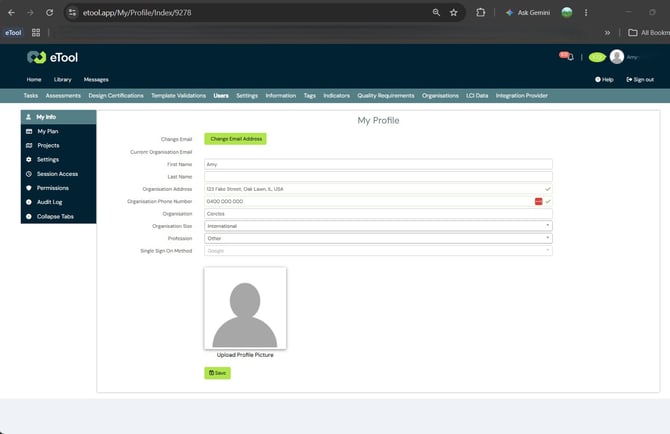
My Profile

My Profile holds the information associated with your individual account. Enter your details as prompted — some fields are mandatory. This includes your name, contact details, profession, and profile picture, along with your email address and Single Sign-On method, both covered below.

Your email address matters most if you belong to, or plan to join, an organisation. Invitations are matched to the email address on your eTool account, so if your admin is inviting you, make sure they use the same address shown here.

If you need to change the email address on an existing account you want to keep — for example, following a change of email provider — submit a support ticket and Cerclos can update it for you, provided you can still verify your identity.


My Plan

My Plan shows your individual eTool plan and any organisation memberships.

Your individual plan (e.g. Trial) is separate from any organisation you belong to — see Creating your eTool user account for why this status doesn't change once you join a paid organisation.

You can also see the organisations you belong to here, along with the access or seat assigned to you in each — you may belong to more than one. For questions about your organisation's plan, subscription, or seat allocation, contact your organisation admin.

My Projects

My Projects lists the projects associated with your individual account. These are separate from projects you access through an organisation — joining an organisation doesn't automatically convert your personal projects into organisation projects, so your account can hold projects independent of any organisation you belong to.

You can, however, edit a project's settings at any point to assign it to an organisation at any stage.

My Settings

My Settings lets you manage preferences that affect your individual eTool experience.

  • Notification settings — manage preferences including eTool news and project profile notifications, general eTool notifications.

  • Application settings — manage preferences such as rounding figures to three significant figures and enabling two-factor authentication  for additional account security.

  • Report customisation — add information used when generating reports, such as a user bio or custom disclaimer.

  • Report images — manage images used in your reports, including your company logo and stored signature.


Keeping your profile up to date

Keep your personal information and preferences current. Updating your profile doesn't change your organisation's subscription or user permissions — for organisation-level changes, contact your admin.